7. Device Update
Every now and then a new-feature or stability update is released. You can easily update to the latest version in the app.
How to Update
- Tap the ⚙ next to the zone name → [Zone device settings] → [Firmware update]
- If you see "Update available", tap [Update] for each device, or [Update all] (when there are 2 or more devices)
- ⚠️ Do not turn off the power while it's in progress. (About 1–2 minutes; briefly offline during that time)
- When finished, the blind restarts → done!
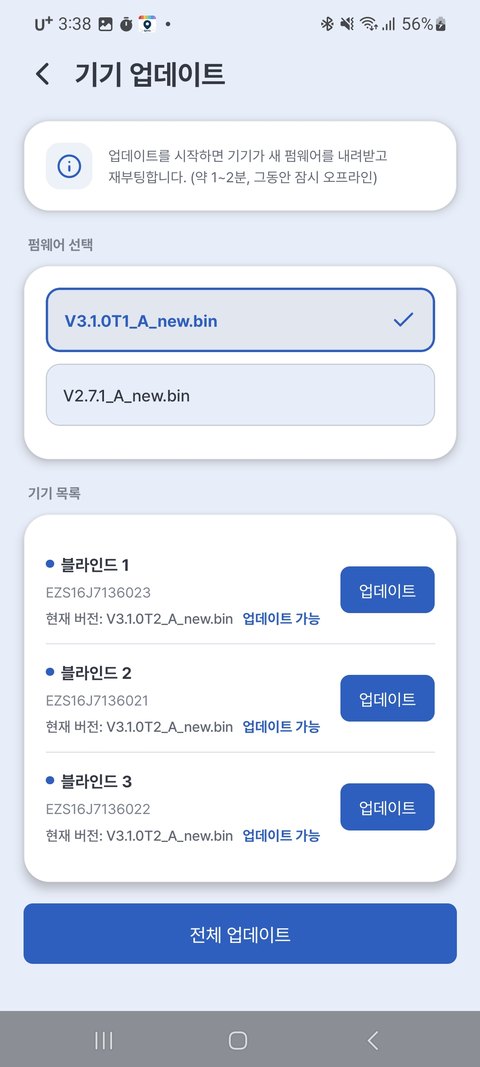
| Display | Meaning |
|---|---|
| Up to date next to the version · gray [Up to date] button | Already latest — nothing to do |
| Update available next to the version · [Update] button | Tap to update to the latest |
| Current: — (no label) | The version hasn't been read yet — check that the device is online, then reopen the screen |
⚠️ Cautions during the update
- Do not turn off or unplug the power while it's in progress.
- The blind must be connected to the internet (your home Wi-Fi).
- A brief unresponsive moment is normal — it restarts automatically when done.
💡 Updates aren't mandatory, but they're recommended since they include new features and stability improvements.
💡 Home Assistant Hybrid integration (use alongside the app) requires firmware V3.2.0 or later. Check the current version under [Zone device settings] → [Device info] → Firmware.