4. Using Multiple Blinds Together
If you have installed several blinds, you can control them all at once by zone (room) and line up their heights neatly.
Controlling a Whole Zone at Once
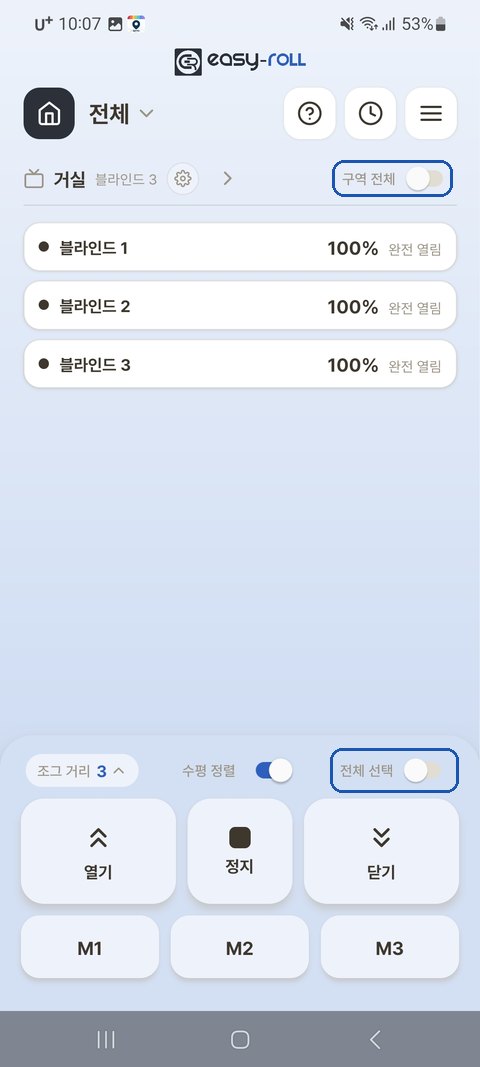
On the main screen, turning on the [Whole zone] toggle selects that entire zone, and the [Select all] toggle on the control panel selects every blind on the screen.
Lining Up Heights Neatly — Auto-Level
When you raise or lower several blinds together in one zone and then press [Stop], this feature automatically lines up the heights of the blinds that moved, using either the highest one (when raising) or the lowest one (when lowering) as the reference.
① Turn It On First (once per zone)
Tap the ⚙ next to the zone name → [Zone device settings] → [Auto-Level] → set the zone you want to align to ON
💡 The [Auto-Level] toggle on the main-screen control panel turns it on or off for all zones at once. (Turning it off also clears the settings you made for each zone.) To use it only in certain zones, turn it on zone by zone under [Zone device settings] → [Auto-Level] above.
ℹ️ This setting is saved on this phone (app) only. Family members or other phones need to turn it on separately.
② Using It
In a zone where Auto-Level is on, after moving two or more blinds together:
| Action | Result |
|---|---|
| [Stop] after raising | The rest line up to the highest one |
| [Stop] after lowering | They line up to the lowest one |
| Press and hold [Stop] for 1.5 seconds or longer | An [Align to top] · [Align to bottom] · [Align to average] popup appears → they line up to the height you choose (highest · lowest · average height) |
💡 Automatic alignment runs when you press [Stop] within 1 minute of pressing [Open] or [Close]. (Moves made with M1–M3 or % are not auto-aligned.) If the blinds stopped on their own before you pressed [Stop] (for example, after a short press that moved them only a little), press [Stop] once within 1 minute. (If you have already pressed [Stop] once, or more than 1 minute has passed, another short press of [Stop] does nothing.)
💡 Only the blinds that moved are aligned. (For example, if you raise and stop only 2 of 4 blinds, only those 2 are lined up.)
💡 Even when the blinds are different lengths, they are aligned so that the bottom bars actually end up level.
💡 To choose the alignment height yourself — keep holding [Stop] for 1.5 seconds or longer without letting go, and an [Align to top] · [Align to bottom] · [Align to average] popup appears. Pick one and the selected blinds line up neatly at that height. You can use this at any time, even if you haven't just moved them — simply select the blinds you want to align first. (If you let go before 1.5 seconds, no popup appears and they align by movement direction as usual.)
ℹ️ The popup appears only when there is something to align — that is, when you have selected two or more blinds at different heights in a zone where Auto-Level is on.
ℹ️ Auto-Level works by adjusting after the blinds stop, so you may see a slight correction movement at the end right after stopping. This is normal.
If a Blind Has a Weak WiFi Signal
A blind far from your router may respond slowly because of a weak signal.
- It helps to move the router closer to the blinds, or to add a WiFi booster (extender).
- If just one blind is repeatedly slow or keeps dropping out, check the signal strength at that location.