6. Changing the Wi-Fi Router
If you've replaced your router with a new one, or your Wi-Fi name or password has changed, your blind can't connect to the internet. When this happens, just re-enter the updated Wi-Fi information on the device.
When You'll Need This
- When you've replaced your internet router with a new one
- When you've changed your Wi-Fi name or password
- When you've moved and are using a different router
If the new router keeps the same name and password, it reconnects on its own, so this process isn't needed.
How to Change It
-
⚙ next to the zone name → [Zone device settings] → [Change Wi-Fi]
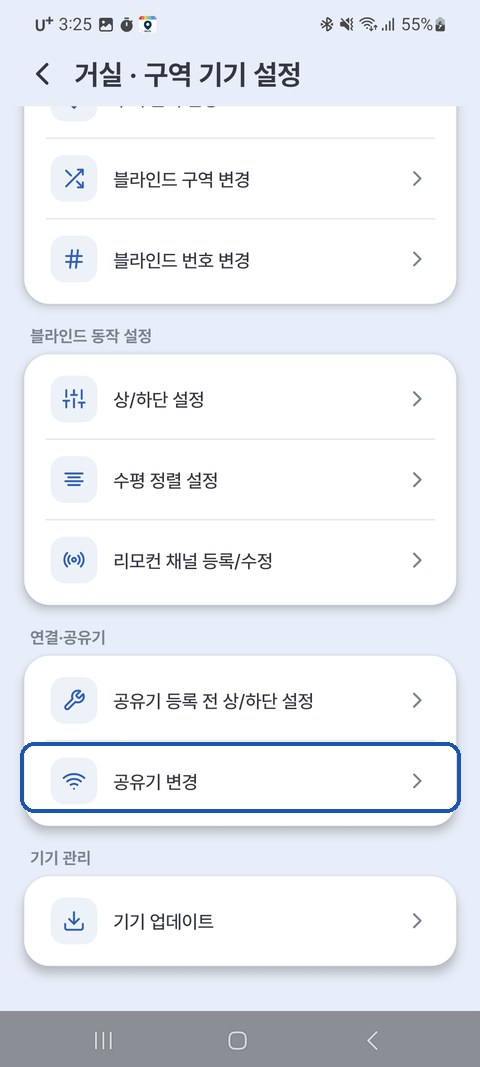
-
Pick the option that fits your situation.
- [I have not changed the router yet] — the device is still connected to the old router (the blind still moves from the app). Choose the devices to reset and tap [Reset Wi-Fi and continue]; the device switches to setup mode and then connects to the new router. If you haven't swapped the router yet, this is the most reliable way.
- [I already changed the router] — you've already switched to the new router and the device dropped off. → See When Only the Router Changed and the Device Dropped Off below.
- Follow the guidance → enter the new Wi-Fi name and password
- Wait a moment for the connection to the new router to complete
⚠️ On a device that also uses HA (Hybrid), resetting with [I have not changed the router yet] also clears the HA connection settings. After connecting to the new router, run ⚙ → [Zone device settings] → [Home Assistant] again.
💡 The [Up/down setting before device registration] option in the same menu is for when you want to set the upper/lower limits first, without a Wi-Fi connection.
💡 The new Wi-Fi must also be 2.4GHz. (not
...5G)
When Only the Router Changed and the Device Dropped Off (Automatic AP Mode)
If you only changed the router and the device can't find its old Wi-Fi, just wait a moment — the device returns to setup mode (AP) on its own. (firmware V2.9.7 or later)
When an EZS... network reappears in your phone/PC Wi-Fi list, it's ready.
💡 You can check the firmware version while the device is connected: ⚙ → [Zone device settings] → [Device info] → Firmware.
- Wait 1–2 minutes until the device Wi-Fi (
EZS...) appears in the list. (Don't unplug it — a power cycle restarts the attempts and makes it take longer.)- If the device runs firmware older than V2.9.7, or
EZS...still hasn't appeared after 2–3 minutes, hold the button on the unit for 5 seconds to reset its Wi-Fi settings. WhenEZS...appears shortly after, continue from step 2 below in the same way. (The registration and upper/lower limits are kept. However, a button reset clears the HA connection settings, so on a Hybrid device run [Home Assistant] in the app again after connecting.)
- If the device runs firmware older than V2.9.7, or
-
Enter the new router (Wi-Fi) info according to how you used the device.
- Standard (app only) or Hybrid (app + HA together) device — in the EasyRoll app, zone ⚙ → [Zone device settings] → [Change Wi-Fi] → [I already changed the router] → select the device → follow the guidance to enter the new Wi-Fi name and password
- The app joins the device Wi-Fi (
EZS...) by itself, so you don't need to connect to it on your phone. (On iPhone, you scan the device QR code instead of searching nearby.) - When the device returned to setup mode on its own, a Hybrid device keeps its saved HA settings too. (If the HA machine's IP also changed with the new router, run ⚙ → [Zone device settings] → [Home Assistant] again in the app with the new address after connecting.)
- The app joins the device Wi-Fi (
- HA-only device — use a browser. The device's own setup pages are in Korean only, so the Korean labels are shown with English in parentheses.
- In your phone/PC Wi-Fi settings, connect to
EZS....- The device Wi-Fi password is
u67184+ the last 3 digits of the device name. (e.g. nameEZS...123→u67184123)
- The device Wi-Fi password is
- Enter
192.168.4.1in the address bar (Google Chrome recommended) → [Home Assistant] → enter the new Wi-Fi + HA broker info → [저장하고 연결] (Save and Connect) → for details, see Method ②-B in HA Integration · 2. Connecting the Device - Skip [⚙ 상/하단 설정] (Upper/Lower Limit Setup) on the first screen. The upper/lower limits are still saved.
- In your phone/PC Wi-Fi settings, connect to
⚠️ Don't save a Hybrid device from the browser's [Home Assistant] screen. Saving there switches it to HA only, and app control stops. Always change it from the app.
- Standard (app only) or Hybrid (app + HA together) device — in the EasyRoll app, zone ⚙ → [Zone device settings] → [Change Wi-Fi] → [I already changed the router] → select the device → follow the guidance to enter the new Wi-Fi name and password
-
Wait a moment and it reconnects to the new router automatically.
If you can't use the app — enter the new Wi-Fi with the browser's [HTTP] (Standard / Hybrid devices)
Use the app whenever you can. Use this method only when the app isn't available.
Devices with firmware older than V2.9.7 don't have the first screen below. Connect your phone/PC to the EZS... Wi-Fi, enter 192.168.4.1:25867/router in the address bar, and continue from step 2.
-
Connect your phone/PC to the
EZS...Wi-Fi, then enter192.168.4.1in the address bar → [HTTP]![Device setup first screen — the [Home Assistant] and [HTTP] buttons](../../../images/ha/setup_home.jpg)
-
Enter Router SSID (the new Wi-Fi name) and Router PW (its password).
- Be sure to tick 서버세션ON (Server session ON). If you leave it unticked, you can no longer control the blind from the app.
-
[등록하기] (Register) → tap OK on the pop-up → it's done when SUCCESS appears (this can take up to 1 minute).
It's fine if the page just keeps loading. If
EZS...disappears from the Wi-Fi list after about a minute and the blind moves from the app, it has worked.
💡 This screen automatically removes any spaces from the Wi-Fi name and password, and accepts up to 30 characters. If your name or password contains spaces or is longer than 30 characters, this method won't connect — use the app instead.
💡 This method also keeps a Hybrid device's HA settings.
Upper/lower limits and the current position are kept
You only need to re-enter the router (and HA) info — no need to set the limits again.
When It's Not Working
| Symptom | Solution |
|---|---|
| Still no connection after changing | Double-check the new Wi-Fi password → try again |
| Blind is unresponsive | Unplug the blind, plug it back in, and try again after 1 minute (but don't unplug it while you're waiting for EZS... to appear) |
| Still not working | Hold the button on the unit for 5 seconds to reset its Wi-Fi settings, then reconnect with the app's [Change Wi-Fi] → [I already changed the router] (the registration and limits are kept; the HA connection settings are cleared, so if the device used HA, connect it again with HA Integration · 2. Connecting the Device) |